HMI (Screen, Button, and Sound)
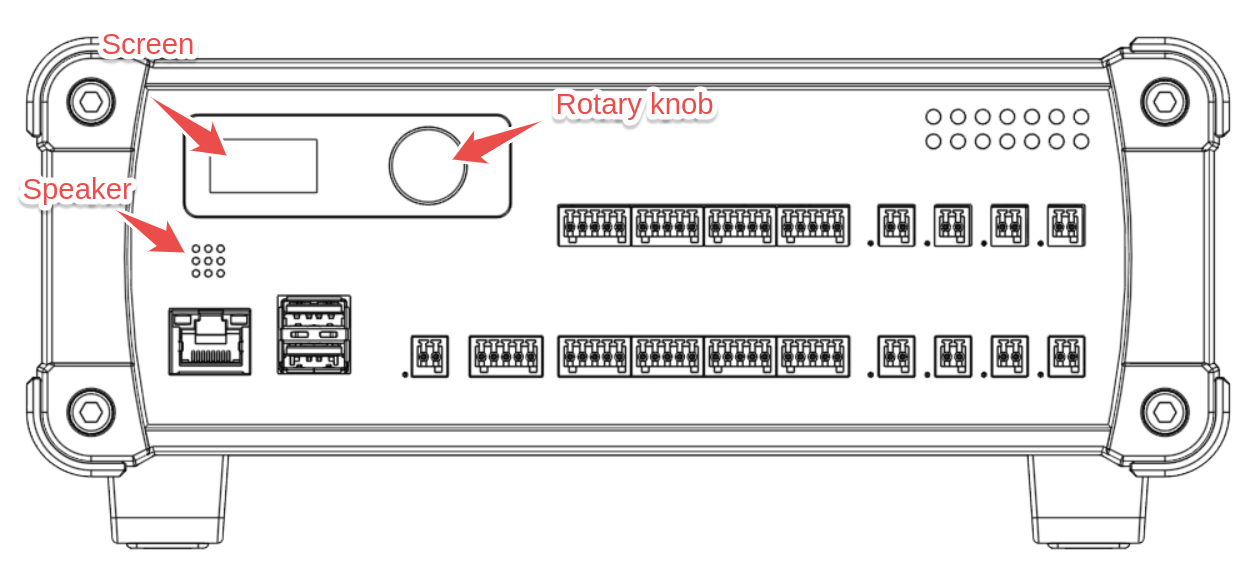
The AT1000 provides a simple yet functional Human-Machine Interface (HMI) that allows engineers to provide user feedback and interaction during test sequences. The HMI consists of:
- A color LCD screen (80 × 160 resolution)
- An audio speaker for notifications
- A rotary knob for user interaction
The image below shows the different elements on the front panel of the AT1000 device:
HMI Capabilities
The HMI is designed for:
- Displaying status messages and progress information to the user.
- Allowing simple user interactions during test sequences.
Built-in single-choice prompts let an operator answer a question with the knob, without programming a menu.
The AT1000's HMI and API are not designed for building complex navigation menus, displaying images, or playing user-defined sound effects. While the hardware is capable of advanced graphics and audio, the HMI is intentionally simplified for ease of use in test automation.
The examples assume that tester is an open AT1000 controlling session.
Asking the operator a question
Ask a question on the screen, then check the result status before using the answer.
- NodeJS
- Python
- Rust
const request = {
  text: "Continue the run?",
  choices: ["Yes", "No"],
};
const result = await tester.hmi.prompt(request);

if (result.status === "selected") {
  console.log(`Selected ${result.selection.index}: ${result.selection.label}`);
} else if (result.status === "timed_out") {
  console.log("No answer: the prompt timed out.");
} else if (result.status === "cancelled") {
  console.log(`Prompt cancelled: ${result.reason}`);
}
from ikalogic_at1000 import PromptRequest

result = tester.hmi.prompt(PromptRequest(
    text="Continue the run?",
    choices=["Yes", "No"],
))

if result.status == "selected":
    print(f"Selected {result.selection.index}: {result.selection.label}")
elif result.status == "timed_out":
    print("No answer: the prompt timed out.")
elif result.status == "cancelled":
    print(f"Prompt cancelled: {result.reason}")
use ikalogic_at1000::{PromptRequest, PromptStatus};

let request = PromptRequest {
    text: "Continue the run?".into(),
    choices: vec!["Yes".into(), "No".into()],
    default_index: None,
    timeout_ms: None,
};
let result = tester.hmi.prompt(&request)?;

match result.status {
    PromptStatus::Selected => println!(
        "Selected {}: {}", result.selection.index, result.selection.label
    ),
    PromptStatus::TimedOut => println!("No answer: the prompt timed out."),
    PromptStatus::Cancelled => println!("Prompt cancelled: {:?}", result.reason),
    PromptStatus::Pending => return Err("prompt returned before completion".into()),
}
Turn the knob to change the selected choice, then click to confirm. Holding the knob for more than five seconds invokes panel reclaim.
Long questions page automatically. The amber deadline bar disappears on the first rotation. The confirmed choice appears briefly before the previous screen returns, unless another owner or the panel replaces it.
See the request fields, results, and ownership rules before combining a prompt with other HMI operations.
Screen Control
The AT1000 screen can display text messages, update the foreground and background colors, and show a progress bar.
Screen mutations conflict with a pending prompt. See prompt ownership.
- NodeJS
- Python
- Rust
// Set the screen colors (text: white, background: blue)
await tester.hmi.screen().colors({ text: "#FFFFFF", background: "#0000FF" });

//Clear all content on the screen
await tester.hmi.screen().clear();

// Display some text, and replace any previous text.
await tester.hmi.screen().print("Test is \nin progress...");

// Update the progress bar to 75%.
// Setting progress to 0 hides the progress bar
await tester.hmi.screen().progress(75);
# Set the screen colors (text: white, background: blue)
tester.hmi.screen().colors(text="#FFFFFF", background="#0000FF")

tester.hmi.screen().clear()  # Clear all content on the screen

tester.hmi.screen().print("Test is \nin progress...")  # Display text

tester.hmi.screen().progress(75)  # Update the progress bar to 75%
use ikalogic_at1000::ScreenColorsPatch;

// Set the screen colors (text: white, background: blue)
tester.hmi.screen().colors(&ScreenColorsPatch {
    text: Some("#FFFFFF".into()),
    background: Some("#0000FF".into()),
    ..Default::default()
})?;

//Clear all content on the screen
tester.hmi.screen().clear()?;

// Display some text, and replace any previous text.
tester.hmi.screen().print("Test is \nin progress...")?;

// Update the progress bar to 75%.
// Setting progress to 0 hides the progress bar
tester.hmi.screen().progress(75.0)?;
Speaker Control
The built-in speaker emits predefined sound effects for success, notifications, and failures. These sounds help alert users about test status.
- NodeJS
- Python
- Rust
// Play success sound at full volume
await tester.hmi.audio().play({ sound_id: "success", volume: 100 });

// Play a notification sound at 50% volume
await tester.hmi.audio().play({ sound_id: "notification_1", volume: 50 });

// Play a failure sound at 80% volume
await tester.hmi.audio().play({ sound_id: "failure", volume: 80 });
# Play success sound at full volume
tester.hmi.audio().play(sound_id="success", volume=100)

# Play a notification sound at 50% volume
tester.hmi.audio().play(sound_id="notification_1", volume=50)

# Play a failure sound at 80% volume
tester.hmi.audio().play(sound_id="failure", volume=80)
use ikalogic_at1000::PlaybackConfiguration;

// Play success sound at full volume
tester.hmi.audio().play(&PlaybackConfiguration { sound_id: "success".into(), volume: 100.0 })?;

// Play a notification sound at 50% volume
tester.hmi.audio().play(&PlaybackConfiguration { sound_id: "notification_1".into(), volume: 50.0 })?;

// Play a failure sound at 80% volume
tester.hmi.audio().play(&PlaybackConfiguration { sound_id: "failure".into(), volume: 80.0 })?;
Knob Interaction
The rotary knob allows for two types of user interactions:
- Push interaction (pressing the knob)
- Rotation interaction (turning left or right, returning pulse counts)
Raw knob reads conflict with a pending prompt. Use its result instead. See prompt ownership.
- NodeJS
- Python
- Rust
let event = await tester.hmi.knob().wait_event(2000); // timeout in milliseconds

if (event) {
  console.log("Button press: " + event.button_pressed);
  console.log("Knob rotation: " + event.rotation_delta);
}
# Wait for an event from the knob, with a 2000 ms (2 s) timeout
event = tester.hmi.knob().wait_event(2000)

# Print the button press state and knob rotation value
if event:
    print(f"Button press: {event.button_pressed}")
    print(f"Knob rotation: {event.rotation_delta}")
use std::time::Duration;

// Wait for an event from the knob, with a 2000 ms (2 s) timeout
let event = tester.hmi.knob().wait_event(Duration::from_millis(2000))?;

// Print the button press state and knob rotation value
if let Some(event) = event {
    println!("Button press: {}", event.button_pressed);
    println!("Knob rotation: {}", event.rotation_delta);
}
API Reference
Accessing HMI
- NodeJS
- Python
- Rust
const hmi = tester.hmi;
hmi = tester.hmi
let hmi = &tester.hmi;
HMI Module Methods
prompt(request)
Displays a single-choice prompt and waits for selection, timeout, or cancellation.
| SDK | Contract |
|---|---|
| JavaScript | prompt(request: PromptRequestInput, options?: { signal?: AbortSignal }): Promise<PromptState> |
| Python sync | prompt(request: PromptRequest) -> PromptState |
| Python async | async prompt(request: PromptRequest) -> PromptState |
| Rust | prompt(&self, request: &PromptRequest) -> Result<PromptState, At1000Error> |
With ikalogic_at1000.aio.AT1000, call the Python method with await. It accepts the same PromptRequest and returns the same PromptState.
Request fields
| Field | Meaning and limits |
|---|---|
text | Nonblank question, at most 256 UTF-8 bytes. Line feeds are allowed, but no other control characters. |
choices | 1–32 choices in display order. JavaScript and Python accept strings or objects with label and optional color. Rust uses PromptChoice, with .into() for uncolored strings. |
label | Nonblank, at most 64 UTF-8 bytes, with no control characters. Duplicate labels are valid: position identifies a choice. |
color | Optional choice background in #RRGGBB format. Default: #1769AA. The device chooses contrasting black or white text. |
default_index | Zero-based initial highlight, below the number of choices. Default: 0. It does not confirm a choice. |
timeout_ms | Integer milliseconds from 1,000 through 1,800,000, inclusive. Default: 60,000. Guards an untouched prompt. |
The LCD rejects question or label characters missing from its Montserrat font.
The first knob rotation permanently disables the device deadline. This applies even if the highlight cannot move at an endpoint. timeout_ms is not a maximum duration for operator interaction.
For example, give a destructive choice a distinct background and make it the initial highlight:
- NodeJS
- Python
- Rust
const request = {
  text: "Choose the next action.",
  choices: [
    { label: "Retry", color: "#1769AA" },
    "Skip",
    { label: "Abort run", color: "#B3261E" },
  ],
  default_index: 2,
  timeout_ms: 60000,
};
from ikalogic_at1000 import PromptRequest

request = PromptRequest(
    text="Choose the next action.",
    choices=[
        {"label": "Retry", "color": "#1769AA"},
        "Skip",
        {"label": "Abort run", "color": "#B3261E"},
    ],
    default_index=2,
    timeout_ms=60000,
)
use ikalogic_at1000::{PromptChoice, PromptRequest};

let request = PromptRequest {
    text: "Choose the next action.".into(),
    choices: vec![
        PromptChoice { label: "Retry".into(), color: Some("#1769AA".into()) },
        "Skip".into(),
        PromptChoice { label: "Abort run".into(), color: Some("#B3261E".into()) },
    ],
    default_index: Some(2),
    timeout_ms: Some(60000),
};
Result: PromptState
| Field | Meaning |
|---|---|
id | Opaque prompt resource ID, not a choice identifier. |
status | pending, selected, cancelled, or timed_out. The high-level SDK call waits for a terminal result. |
selection | Always present as { label, index }. Current highlight while pending, confirmed choice when selected, last highlight otherwise. |
reason | Cancellation only: client_cancelled, session_ended, panel_exit, or display_replaced. |
Rust uses PromptStatus::{Pending, Selected, Cancelled, TimedOut} and Option<PromptCancelReason>. The reason variants are ClientCancelled, SessionEnded, PanelExit, and DisplayReplaced.
Prompt ownership and errors
The controlling session owns the prompt. Only one prompt can be pending on a device.
While a prompt is pending, another prompt, screen mutations, hmi.reset(), and raw knob reads return CONFIGURATION_CONFLICT. Audio and unrelated hardware operations remain available.
Timeout and server-side cancellation return results. Validation, transport, and API failures raise errors. Do not use whole-device tester.reset() to cancel a prompt: it is not an atomic cancellation operation.
JavaScript accepts an AbortController signal. For example, this gives the application its own ten-second cancellation deadline:
const controller = new AbortController();
const timer = setTimeout(() => controller.abort(), 10000);
try {
  const result = await tester.hmi.prompt(request, { signal: controller.signal });
  console.log(result.status);
} finally {
  clearTimeout(timer);
}
An abort rejects with the original abort reason and attempts server cancellation. Python synchronous interruption and async task cancellation also attempt best-effort server cancellation before propagating the original exception. Rust has no extra cancellation argument.
SDK waits follow hmi.prompt events and read the state again when their event window expires. They do not impose an unconditional local deadline after the operator engages.
Losing the network alone does not cancel the prompt. After engagement, it can remain pending until confirmation, cancellation, or session loss. Losing control of the device cancels a pending prompt.
Prompt REST endpoints
Direct API clients must send the active X-AT1000-Session header on all three routes.
| Request | Result |
|---|---|
POST /v0/hmi/prompts | Create a prompt. Returns HTTP 201 and PromptState. |
GET /v0/hmi/prompts/{id} | Read the owning session's state. |
DELETE /v0/hmi/prompts/{id} | Cancel a pending prompt with client_cancelled. Returns an already-terminal state unchanged. |
REST choices must be objects, rather than the SDK string shorthand:
{
  "text": "Continue the run?",
  "choices": [{"label": "Yes"}, {"label": "No"}],
  "default_index": 1,
  "timeout_ms": 60000
}
Example state after the operator confirms No:
{
  "id": "42",
  "status": "selected",
  "selection": {"label": "No", "index": 1}
}
For a valid owning session, unknown, expired, or other-owner IDs return HTTP 404 RESOURCE_NOT_FOUND. The session gate can reject missing or revoked tokens first. Invalid fields return HTTP 400.
Terminal results last up to five minutes, with at most the newest 32 retained.
Other HMI module methods
reset()
Resets the HMI to its default state.
This returns CONFIGURATION_CONFLICT while a prompt is pending. See prompt ownership.
- NodeJS
- Python
- Rust
await tester.hmi.reset();
tester.hmi.reset()
tester.hmi.reset()?;
Returns: Promise<void> / None / Result<(), At1000Error>
screen()
Access the screen interface for display operations.
- NodeJS
- Python
- Rust
const screen = tester.hmi.screen();
screen = tester.hmi.screen()
let screen = tester.hmi.screen();
Returns: Screen instance / Screen in Rust (returned directly, not a Result)
audio()
Access the audio interface for sound playback.
- NodeJS
- Python
- Rust
const audio = tester.hmi.audio();
audio = tester.hmi.audio()
let audio = tester.hmi.audio();
Returns: Audio instance / Audio in Rust (returned directly, not a Result)
knob()
Access the rotary knob interface for user input.
- NodeJS
- Python
- Rust
const knob = tester.hmi.knob();
knob = tester.hmi.knob()
let knob = tester.hmi.knob();
Returns: Knob instance / Knob in Rust (returned directly, not a Result)
Screen Class
Screen modifications return CONFIGURATION_CONFLICT while a prompt is pending. See prompt ownership.
print(text)
Displays text on the screen.
- NodeJS
- Python
- Rust
await screen.print("Test in progress...");
screen.print("Test in progress...")
let screen = tester.hmi.screen();
screen.print("Test in progress...")?;
Parameters:
text(string/str/&str): Text to display (max 1024 characters)
Returns: Promise<string> / str / Result<String, At1000Error> - The displayed text
Exceptions:
- Throws validation error if text exceeds 1024 characters
colors(config)
Sets the screen color scheme.
- NodeJS
- Python
- Rust
await screen.colors({
  text: "#FFFFFF",
  progress: "#00FF00",
  background: "#000000"
});
screen.colors(
    text="#FFFFFF",
    progress="#00FF00",
    background="#000000",
)
use ikalogic_at1000::ScreenColorsPatch;

let screen = tester.hmi.screen();
screen.colors(&ScreenColorsPatch {
    text: Some("#FFFFFF".into()),
    progress: Some("#00FF00".into()),
    background: Some("#000000".into()),
})?;
Parameters:
config(Color/&ScreenColorsPatchin Rust): Color configuration object:text(string/str/Option<String>, optional): Text color in hex format (#RRGGBB)progress(string/str/Option<String>, optional): Progress bar color in hex format (#RRGGBB)background(string/str/Option<String>, optional): Background color in hex format (#RRGGBB)
Returns: Promise<Color> / Color / Result<ScreenColors, At1000Error> - The applied color configuration
Exceptions:
- Throws validation error if color strings are not valid hex colors (#RRGGBB format)
progress(value)
Sets the progress bar value.
- NodeJS
- Python
- Rust
await screen.progress(50);  // 50%
await screen.progress(0);   // Hide progress bar
screen.progress(50)  # 50%
screen.progress(0)   # Hide progress bar
let screen = tester.hmi.screen();
screen.progress(50.0)?; // 50%
screen.progress(0.0)?;  // Hide progress bar
Parameters:
value(number/int/f64): Progress percentage (0 to 100). Setting to 0 hides the progress bar.
Returns: Promise<Progress> / Progress / Result<f64, At1000Error> - Object containing the progress value
Exceptions:
- Throws validation error if value is outside the range [0, 100]
clear()
Clears the screen display.
- NodeJS
- Python
- Rust
await screen.clear();
screen.clear()
let screen = tester.hmi.screen();
screen.clear()?;
Returns: Promise<void> / None / Result<(), At1000Error>
clear_text()
Clears only the text area, keeping colors and the progress bar.
- NodeJS
- Python
- Rust
await screen.clear_text();
screen.clear_text()
let screen = tester.hmi.screen();
screen.clear_text()?;
Returns: Promise<void> / None / Result<(), At1000Error>
Audio Class
play(config)
Plays a sound with specified volume.
- NodeJS
- Python
- Rust
await audio.play({
  sound_id: "success",
  volume: 80
});
audio.play(sound_id="success", volume=80)
use ikalogic_at1000::PlaybackConfiguration;

let audio = tester.hmi.audio();
audio.play(&PlaybackConfiguration { sound_id: "success".into(), volume: 80.0 })?;
Parameters:
config(PlaybackConfiguration/&PlaybackConfigurationin Rust):sound_id(string/str/String, required): Sound identifier - one of:"success"- Success/pass sound"warning"- Warning sound"failure"- Failure/error sound"notification_1"- Notification sound 1"notification_2"- Notification sound 2"imperial_march"- Imperial March theme !
volume(number/int/f64, required): Volume level (0 to 100)
Returns: Promise<PlaybackConfiguration> / PlaybackConfiguration / Result<PlaybackConfiguration, At1000Error> - The playback configuration
Exceptions:
- Throws validation error if
sound_idis not one of the valid values - Throws validation error if volume is outside the range [0, 100]
Knob Class
Knob reads require control of the device and return CONFIGURATION_CONFLICT while a prompt is pending. See prompt ownership.
wait_event(timeout_ms)
Waits for a knob event (rotation or button press) with a timeout.
- NodeJS
- Python
- Rust
const event = await knob.wait_event(5000);  // Wait up to 5 seconds

if (event) {
  console.log("Button pressed:", event.button_pressed);
  console.log("Rotation delta:", event.rotation_delta);
} else {
  console.log("Timeout - no event");
}
event = knob.wait_event(5000)  # Wait up to 5 seconds

if event:
    print(f"Button pressed: {event.button_pressed}")
    print(f"Rotation delta: {event.rotation_delta}")
else:
    print("Timeout - no event")
use std::time::Duration;

let knob = tester.hmi.knob();
let event = knob.wait_event(Duration::from_secs(5))?; // Wait up to 5 seconds

if let Some(event) = event {
    println!("Button pressed: {}", event.button_pressed);
    println!("Rotation delta: {}", event.rotation_delta);
} else {
    println!("Timeout - no event");
}
Parameters:
timeout_ms(number/int/Duration, optional): Timeout in milliseconds. Omit to wait indefinitely
Returns: Promise<KnobEvent | null> / KnobEvent | None / Result<Option<KnobEventResult>, At1000Error> - Event object or null/None if timeout
In Rust the timeout is a std::time::Duration and is mandatory; Duration::ZERO returns None without contacting the device.
KnobEvent properties:
button_pressed(boolean/bool/bool): True if button was pressed during this eventrotation_delta(number/int/i32):+1for a clockwise step,-1for a counter-clockwise step
is_button_held()
Checks if the knob button is currently held down.
- NodeJS
- Python
- Rust
const held = await knob.is_button_held();
console.log("Button is", held ? "held" : "not held");
held = knob.is_button_held()
print("Button is", "held" if held else "not held")
let knob = tester.hmi.knob();
let held = knob.is_button_held()?;
println!("Button is {}", if held { "held" } else { "not held" });
Returns: Promise<boolean> / bool / Result<bool, At1000Error> - True if button is pressed, false otherwise
is_knob_turned()
Polls once and reports whether the knob moved at least one step since the previous poll.
- NodeJS
- Python
- Rust
const turned = await knob.is_knob_turned();
turned = knob.is_knob_turned()
let knob = tester.hmi.knob();
let turned = knob.is_knob_turned()?;
Returns: Promise<boolean> / bool / Result<bool, At1000Error>
Types
Color
{
  text?: string,        // Hex color: #RRGGBB
  progress?: string,    // Hex color: #RRGGBB
  background?: string   // Hex color: #RRGGBB
}
Rust: ikalogic_at1000::ScreenColorsPatch (what you send) and ikalogic_at1000::ScreenColors (what the device returns)
pub struct ScreenColorsPatch {
    pub text: Option<String>,
    pub progress: Option<String>,
    pub background: Option<String>,
}

pub struct ScreenColors {
    pub text: String,
    pub progress: String,
    pub background: String,
}
Progress
{
  progress: number  // 0 to 100
}
Rust: f64 - Screen::progress takes and returns the percentage itself, with no wrapper type.
PlaybackConfiguration
{
  sound_id: "success" | "warning" | "failure" |
            "notification_1" | "notification_2" | "imperial_march",
  volume: number  // 0 to 100
}
Rust: ikalogic_at1000::PlaybackConfiguration
pub struct PlaybackConfiguration {
    pub sound_id: String,
    pub volume: f64,
}
KnobEvent
{
  button_pressed: boolean,
  rotation_delta: number
}
Rust: ikalogic_at1000::KnobEvent (returned by read_event()) and ikalogic_at1000::KnobEventResult (returned by wait_event())
pub struct KnobEvent {
    pub button_pressed: bool,
    pub button_held: bool,
    pub rotation_delta: i32,
}

pub struct KnobEventResult {
    pub button_pressed: bool,
    pub rotation_delta: i32,
}
Notes
- Screen resolution is 80 × 160 pixels
- Screen supports multi-line text with
\nline breaks - Maximum screen text length is 1024 characters
- Colors must be in hex format with leading
#(e.g.,#FF0000) - Volume ranges from 0 (mute) to 100 (maximum)
- Knob
rotationis cumulative since last read (positive = clockwise) - The
wait_event()method blocks until an event occurs or timeout - Use
clear()before updating screen to prevent text overlap - Progress bar value is independent of displayed text