Download MT25C Factory
Windows 10 and 11
v0.1.5Linux Ubuntu 22.04 and later (x64)
v0.1.5macOS 11 and later
v0.1.5MT25C Factory is the production-test application. To send individual commands to the tester and see the raw protocol, use MT25C Term instead.
By downloading and using MT25C Factory, you agree to the Ikalogic Software License Agreement.
About MT25C Factory
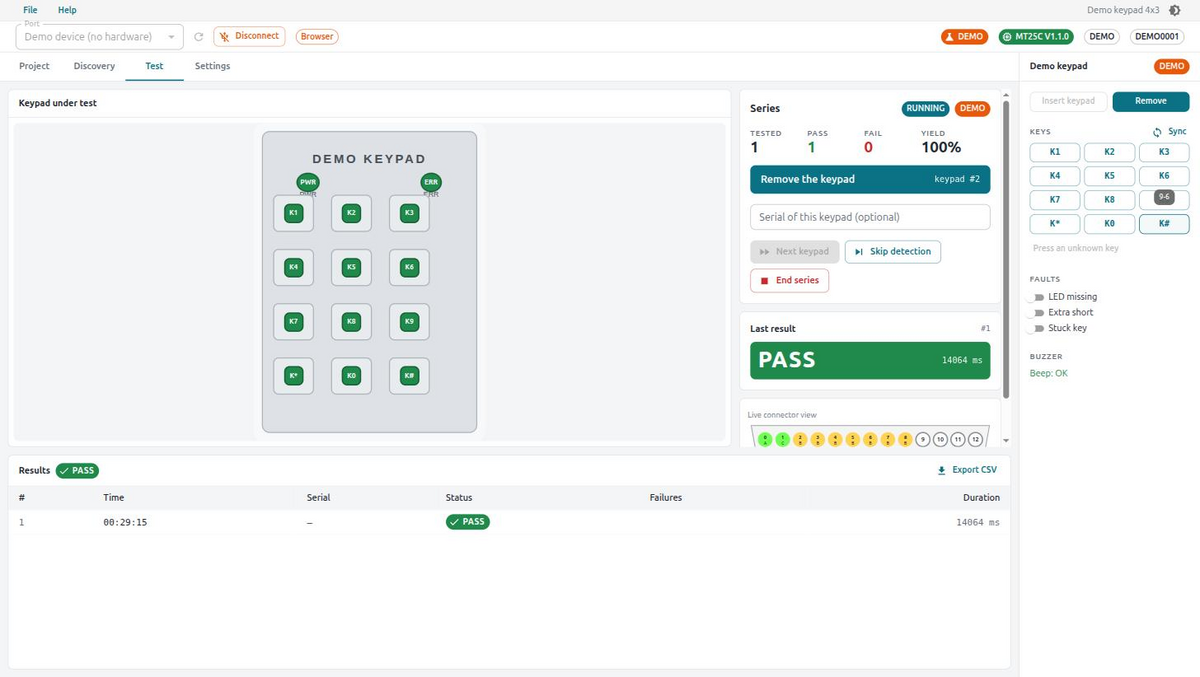
MT25C Factory is the production-test application for membrane keypads. Load a photo or drawing of the keypad, place its keys and LEDs on the picture, let the MT25C learn which contacts each key closes (discovery mode), then run test series: every keypad is checked against the reference — LEDs, shorts, each key in turn — with a clear PASS / FAIL, a beep from the tester, and a CSV log carrying date, time, operator and failure details. Projects are saved as files and shared between test stations. Windows, macOS and Linux; updates are offered from within the application.
Updating the tester's firmware
MT25C Factory ships with the latest tester firmware and can flash it over the USB cable — no programmer or extra software. When you connect a tester running older firmware, the application tells you an update is available; choose Help ▸ Update device firmware… and it rewrites the firmware in a few seconds, then reconnects automatically. If the update is interrupted (for example the cable is unplugged), the tester simply waits in update mode and can be flashed again.
Testers produced before firmware V1.2.0 do not support updating over USB. MT25C Term detects them and shows a notice — please contact Ikalogic for a free update.
Download Previous Releases
Downloads for v0.1.4
- Windows: Download (x64)
- macOS: Download (universal)
- Linux (AppImage): Download
- Linux (DEB): Download
- Linux (RPM): Not available
Release Notes
0.1.5 (18/09/2026)
- feature: One-click firmware updates over USB. Help ▸ Update device firmware… compares the tester's firmware to the version shipped with the app and, when the device supports it (firmware V1.2.0 or later), rewrites it over the existing cable — no debugger or extra tools
- feature: Testers too old to update over USB (firmware before V1.2.0) are detected on connect; the app explains the device must be returned to Ikalogic for a free update
- fix: The port list showed two "MT25C" entries for one tester; the second one was the firmware's debug console and could not connect. Only the protocol port is listed now
- fix: When the system refuses access to the serial port (Linux users not in the
dialoutgroup), the application now says so instead of reporting "no MT25C device found", and offers to install the udev rule for you (administrator password prompt); no replug needed afterwards
- improvement: The .deb package installs the MT25C udev rule, so access works out of the box
0.1.4 (14/09/2026)
- improvement: On Linux, the AppImage now registers itself with the desktop on first launch, so the application shows its own icon in the dock/taskbar and appears in the app launcher
0.1.3 (13/09/2026)
- fix: File → Quit did nothing (the window was not allowed to close itself); the title-bar close button was unaffected
0.1.2 (13/09/2026)
- fix: Installed application opened as an unstyled, unresponsive window (the security policy of release builds blocked the user interface); please reinstall this version
- fix: In-app update check could not read the update manifest
0.1.1 (13/09/2026)
- feature: First published release of MT25C Factory, the production-test application for membrane keypads (Windows, macOS, Linux)
- feature: Project editor — load a photo or drawing of the keypad, place key and LED markers, record the static reference (LEDs and permanent shorts) from a known-good keypad
- feature: Discovery mode — press each key in turn to map it to the contacts it closes
- feature: Test series — insertion detection, static check, every key verified once, PASS/FAIL with beep, per-keypad CSV log (date, time, operator, serial, failures, duration)
- feature: Demo mode with a bundled sample project and fault injection, and a guided tour on first launch (replayable from Help → Welcome tour)
- feature: In-app updates — the app checks for new versions at start-up and from Help → Check for updates…