Download AT1000-Interface
Windows 10 and 11
v0.9.2Linux Ubuntu 18.04 and later (x64)
v0.9.2macOS 10.13 and later
v0.9.2AT1000-Interface License Agreement
By downloading and using AT1000-Interface, you agree to the Ikalogic Software License Agreement.
About AT1000-Interface
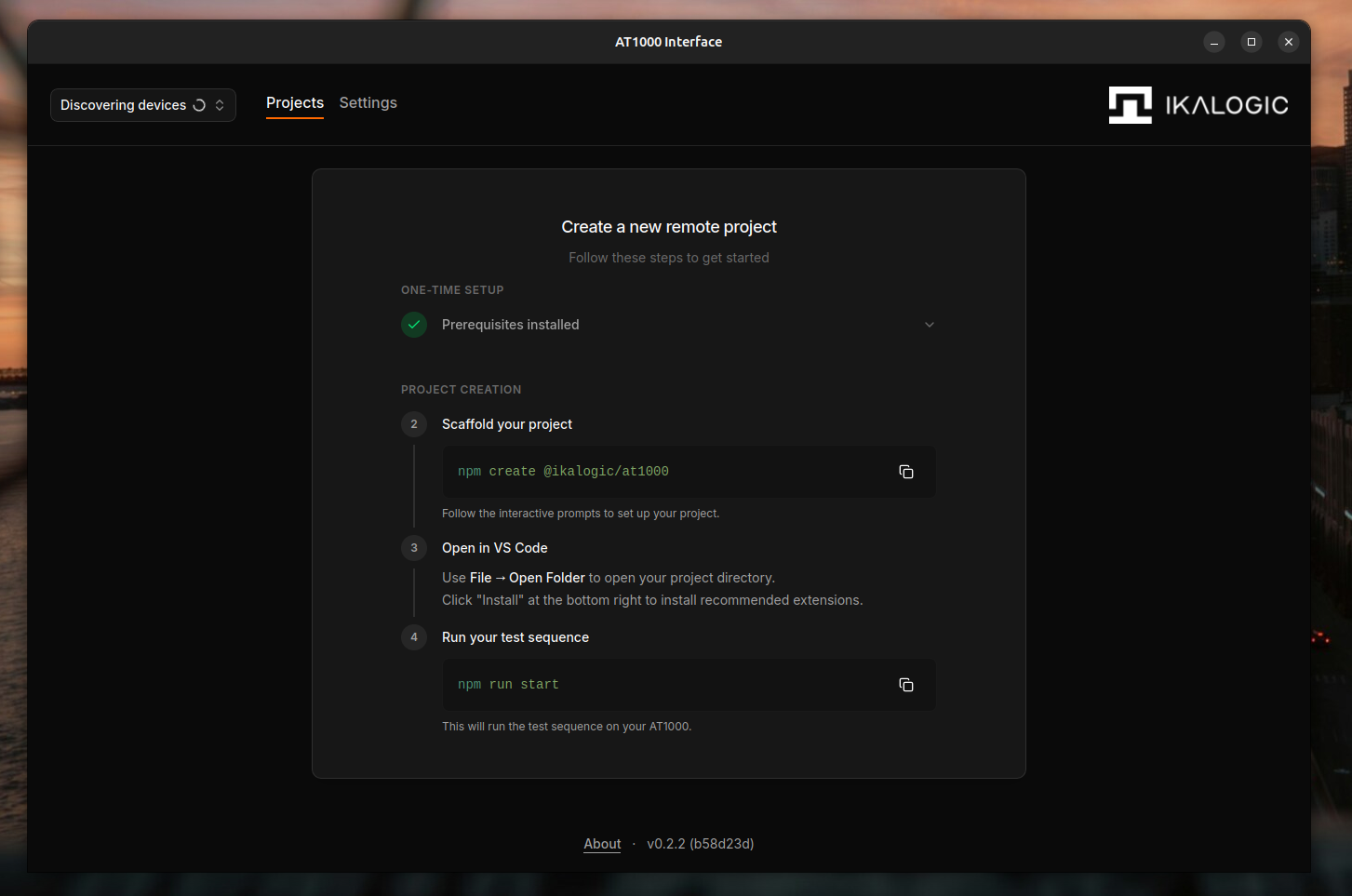
AT1000-Interface is the software used to manage AT1032S Test Sequencer projects hosted on the device. Designed with simplicity and power in mind, AT1000-Interface provides an intuitive graphical user interface for preparing, managing, and interacting with AT1032S test projects. Whether you're setting up a new validation workflow, updating device-side projects, or coordinating test-sequencer assets with your development environment, AT1000-Interface offers a clean and efficient environment for starting an AT1032S project.
Download Previous Releases
Downloads for v0.9.1
- Windows: Download (x64)
- macOS: Download (universal)
- Linux (AppImage): Download
- Linux (DEB): Download
- Linux (RPM): Download
Release Notes
0.9.2 (12/10/2026)
- Redesign status indicators and show the active project mode.
- Show loading spinners while actions are in progress.
- Disable code imports when unsupported and show firmware update guidance.
- Keep pasted public keys when saving fails.
0.9.1 (25/09/2026)
- Add Export code to the project menu to save a project's code as .zip or .tar.gz
- Create a project from a .zip or .tar.gz of its code with Import code
- Show the firmware version next to the commit in settings
- Tone down the early hardware revision warning
- Fix an error after deleting a project
- Fix various bugs
0.9.0 (24/09/2026)
- Redesign the app around a sidebar with the device switcher, navigation and dark mode toggle
- Rebuild the projects page as a project list with a tabbed detail pane
- Add an Access tab with the SSH command, Open in VS Code, and a setup checklist
- Publish the SSH port in one click from the Access tab or Open in VS Code
- Allow publishing the same host port on both TCP and UDP
- Mark the default project with a star in the project list
- Show the autodetected startup command as a hint in the project command field
- Redesign the firmware settings tab around the update status
- Show the device network address in settings
- Connect more reliably when the device has several network addresses
- Keep projects and session status up to date after a lost connection comes back
- Fix various bugs
0.8.1 (18/09/2026)
- Show the available firmware version in the update card and notification
- Show which version the device updates from and to before starting the update
- Improve error handling on failed network requests
- Connect to devices more reliably at startup
0.8.0 (18/09/2026)
- Stop a project gracefully; an intentional stop now ends as idle instead of an error
- Show a "Stopping…" status and disable project actions until the stop finishes
0.7.0 (11/09/2026)
- Fix various incompatibilies
- Update internal dependencies
0.6.0 (07/09/2026)
- Check available device storage before uploading firmware, and report insufficient space before starting the transfer
- Show readable device error messages, error codes, and suggested actions when firmware uploads fail instead of raw JSON
- Fix compatibility with firmware 0.5.0
0.5.2 (03/09/2026)
- Projects: Prompt to set the dev-user password when opening a project in VS Code without a local SSH key
- Settings: Refresh disk, RAM, and CPU temperature live while the page is open
- Firmware update: Detect when the device rolls back to the previous version after an update instead of reporting success
0.5.1 (22/07/2026)
- Show release notes in the update dialog rendered as formatted Markdown
- Confirm firmware updates are actually commited on the device before reporting success
- Improve device discovery and reconnection
- Fix duplicate device entries in some cases
0.5.0 (21/07/2026)
- Show RAM usage and CPU temperature on supported devices
- Fix various incompatibilities with previous firmware versions
- Discovery fixes
- Performance improvements